For Podia creators who know they should be blogging
New posts on your Podia blog. Researched and published by Claude Code.
It reads whoever is outranking you, writes 1,500+ words in your voice, makes the hero image and fills in every SEO field, then publishes. On whatever schedule you set. Podia has no blog API, so nothing else can do this: mine drives the admin panel the way a person would, and my own blog runs on it.
One-time payment. Runs on your own machine. You own the files and you set the schedule.

- 9
- Podia fields it fills, every post
- 1,500+
- researched words per post
- 0
- clicks from you once it is scheduled
- You
- set the cadence: daily, weekdays or weekly
The problem
Podia gives you a blog. It does not give you time.
You bought Podia to sell courses, coaching and downloads. The blog tab sits there, quietly costing you the cheapest traffic you will ever get.
Your last post is from months ago. You know the date is embarrassing. You still have not fixed it.
Every visitor arrives from a paid ad or a social post you had to write. The moment you stop, the traffic stops.
Writing one good SEO post takes 4 to 6 hours. Research, outline, draft, edit, format, upload, tag, SEO fields.
Freelance SEO writers charge $150 to $400 a post. Twenty posts a month is a salary you do not have.
Podia has no blog API. So every "just automate it" tool you found does not connect to Podia at all.
Your members search Google, not your store. The people who would buy your course are reading somebody else's article right now.
Why this did not exist until now
Podia has no blog API. That is the whole reason this was hard.
Every other autoblogging setup on the market assumes you are on WordPress, Webflow or Ghost, where there is an API to POST to. Podia has none. If you want a post inside Podia, something has to physically drive the admin panel the way a person would.
So that is what I built, and it broke constantly. It took me weeks and I nearly dropped it twice. Every one of these is solved in the version you are buying.
What broke
How it is fixed
- 1
Markdown links pasted in as plain text. Every link in the article was dead.
Links arrive live. Headings, bold and lists land intact, first attempt, every run.
- 2
The paragraph after every H2 silently inherited the heading style.
Body copy stays body copy, all the way down the post.
- 3
The clipboard write API is blocked in automation, so nothing could be copied in.
Worked around. The clipboard has not been a factor since.
- 4
One paste auto-linked every bare filename and produced 49 dead links in a single post.
Filenames stay plain text. Not one dead link since the fix went in.
- 5
After publishing, Podia offered to email my entire list. One stray click, disaster.
Declined on every single run, and the routine tells you it declined.
Every fix above is already written into the routine files you get. You are buying the dialed-in version rather than the four weeks of failed pastes.
This is not a mockup
Here it is, inside the actual Podia editor.
This is the real Podia admin panel on my own Podia blog, mid-publish. Every field you see was filled in by the routine. Nobody typed any of it.
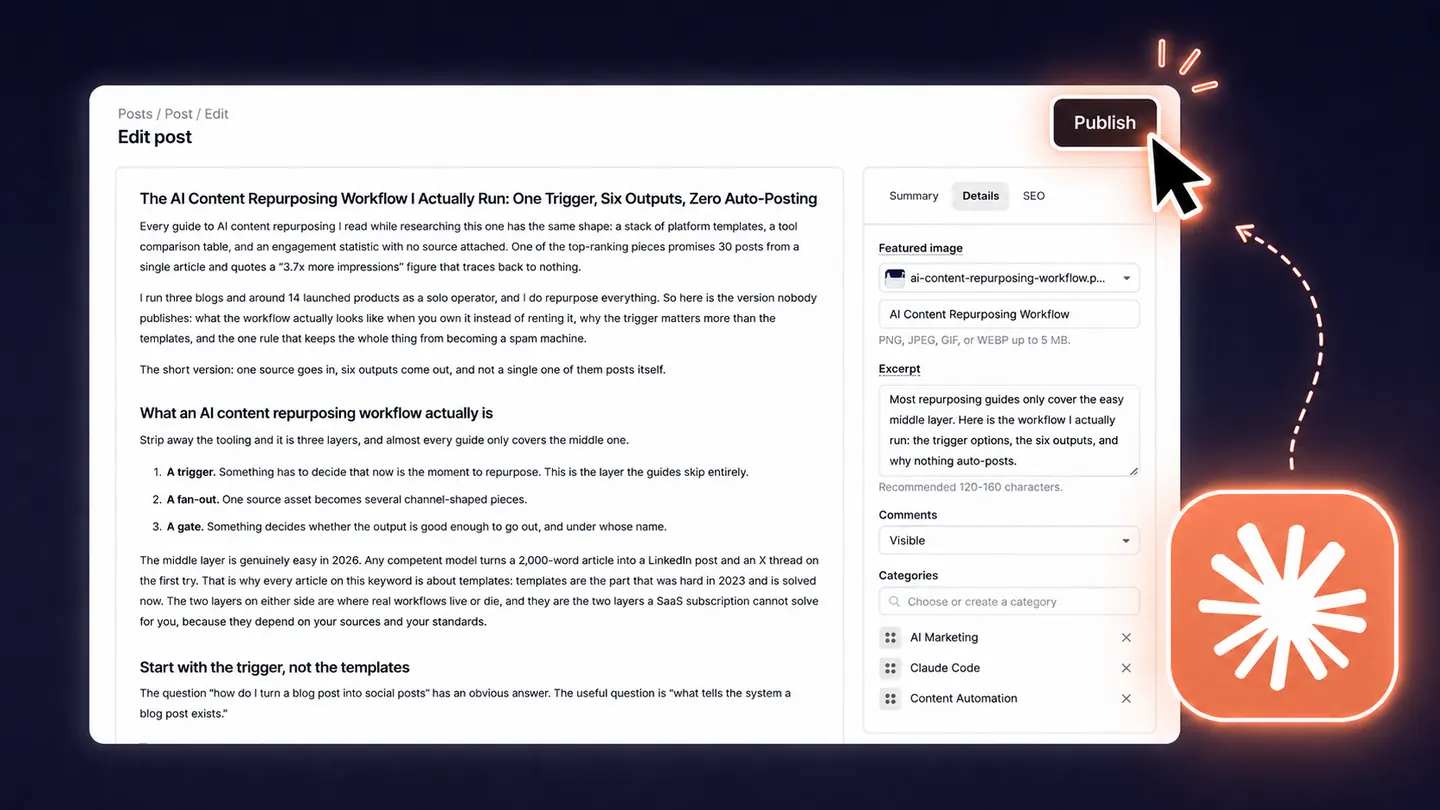
The body
Headings, bold, lists and live links, all landing intact. The part that took weeks to get right.
Excerpt
Written to Podia's own 120 to 160 character recommendation, not truncated from paragraph one.
Featured image
Generated for this specific post, converted, and uploaded into Podia by the routine. You never touch it.
Categories
Created and applied on the fly. Podia's category field fights this harder than anything else on the page. It is handled.
That Publish button is the last thing the routine touches. The screen straight after it offers to email your entire subscriber list, and the routine is hard-coded to decline. Read the post first, email it when you decide.
How it works
Four steps, on your schedule, while you do something else.
Mine runs every weekday because that is what suits me. Yours runs whenever you tell it to. One a day, three a week, one a month, or only when you kick it off by hand.

- 1
Research what is already winning
It picks a topic from your own content, chooses a target keyword, then pulls the pages currently ranking for it and analyses them: length, structure, what they cover, and specifically where they are thin or out of date. That gap analysis is what the article is built to beat.
- 2
Write it in your voice, not generic AI voice
You fill in one writing-style file: your phrasing, your positioning, and a banned-words list that kills the obvious AI tells. Posts run 1,500+ words with headings phrased as real search queries and an FAQ section built from the questions competitors answer badly.
- 3
Publish into Podia, fully configured
It drives your Podia blog panel directly: title, body with live links, a clean keyword slug instead of a random UUID, excerpt, image alt text, categories, SEO title and SEO description. This is the part nothing else on the market does.
- 4
Verify it is actually live, then log it
It loads the published URL and confirms the body rendered before calling the run done. Then it appends the post to a log file so tomorrow's run never repeats a topic and can link back to what it published before. Your internal linking compounds on its own.
The part that matters
This is not a content mill. It sells your stuff.
Most AI writing tools produce articles about your industry. That is not the same as articles that make someone buy your course. Every post this publishes is pointed at something you actually sell.
Your topic, not generic filler
Topics come from your own content and your own keyword plan. If you teach watercolour, it writes about watercolour. It never drifts into the beige business-blog sludge that every AI writer defaults to.
Built to beat your actual competitors
Before writing a word it pulls the pages currently ranking for your keyword, reads them, and works out exactly where they are thin, dated, or dodging the question. The article is then constructed to beat those specific pages. Not to hit a word count.
Every post promotes your Podia products
You fill in one file describing what you actually sell. Each article carries a soft inline mention mid-piece and a clear call to action near the end, pointing at your course, your membership, your coaching. It only claims what your file says is true.
It promotes your events and replays too
Running a live workshop or a webinar? The routine writes the article around it and makes signing up the natural next step. After the event, it points at the replay instead. That is how I use it on my own Podia blog.
The mechanism is boring on purpose: one file describes your offers, one file describes your voice. The routine is forbidden from claiming anything that is not in those files, which is what stops it inventing features, discounts or results you never promised.
Included in every tier
Five more routines and a training that close the loop.
Publishing is one part of the job. A post nobody indexes, nobody measures, nobody refreshes and nobody shares is a post that does nothing. These are the other parts, and they come in the bundle.
Hero Image Generator
REQUIRED, INCLUDEDGenerates a custom 16:9 hero for every post in your own visual style, using Google's Gemini image models. Not stock photography. The prompt recipe that keeps every image on-brand is part of the kit.
Content Calendar Refill
BONUSTwice a month it checks how many topics you have left. When you drop below fifteen, it researches and appends thirty new keyword-backed entries. The publishing routine never runs dry, and you never sit down to plan content again.
Weekly GSC Indexing
BONUSEvery Friday it reads your sitemap, finds the posts published that week, and requests indexing for each one in Google Search Console. It keeps a ledger so it never double-submits, and it stops cleanly when you hit quota.
Weekly SEO Review
BONUSPulls your real Search Console numbers, sorts every post into winning, striking distance, or invisible, then rewrites up to two striking-distance posts to beat whoever is outranking them. It writes what it learns back into the calendar.
Blog to Social Drafts
BONUSEvery weekday it turns the day's post into three social drafts in your voice: one for LinkedIn, two for Facebook. Nothing auto-posts, ever. You review and hit send, which is what keeps your accounts safe and your audience trusting you.
Turn Claude Code Into Your Marketing Team
FREE ACCESSMy full live training, $99 on its own, free with every tier. The replay plus the three marketing workflow repos I run daily: social posts, X replies, and LinkedIn DMs, all drafted in your voice. Claim it from your dashboard.
Plus the hosted tools: the routines lean on custom browser tools your Claude Code agent needs to make Podia auto-publishing work seamlessly. Built for this kit and hosted on our own infrastructure, so they are up every single time your routine runs.
Why these and not a pile of others:together they form one loop. Plan → publish → share → index → measure → feed what you learned back into the plan. I run every one of these on my own blogs. I am not padding the bundle with routines I do not use.
Honest fit check
Who this is for, and who it is not for.
This is for you if
- You sell courses, coaching, memberships or downloads on Podia
- You want traffic that keeps arriving after you stop posting
- You are willing to spend about an hour on first-time setup
- You can leave a computer awake for about 20 minutes whenever it is scheduled to run
- You would rather own the system than rent another subscription
This is not for you if
- You want traffic this week. SEO compounds over months, not days
- You want zero involvement. Setup is yours, and you should read what goes out in your name
- You are not on Podia. This drives the Podia panel specifically
- You want a hosted SaaS with a dashboard. This runs on your machine
- You want content you never read. Publishing unread content is how brands get hurt
Before you buy
What this actually requires.
I would rather you know this now than ask for a refund later.
Claude Code
The routines run inside Claude Code, which needs a Claude subscription. New to it? You can try Claude free with this link before you buy anything here.
Claude's Chrome extension
Free, and the piece that makes this possible. Podia has no API, so the routine drives your admin panel through your own logged-in Chrome. Nothing leaves your machine.
A Gemini API key
Only for hero images. The generator is included in the bundle. Image generation needs billing enabled on your Google account, and costs roughly a dollar a month at a post a day.
Nothing to click, ever
Including the hero image. It gets generated, converted and uploaded into Podia by the routine. Earlier versions of this made you add the image by hand. That step is gone.
A machine that is awake
It runs on your computer at the scheduled time, not on a server. Most people schedule it for the middle of their working day.
On results: this publishes consistently researched posts on a schedule, which is the input SEO rewards. I am not going to quote you a traffic number, because your niche, your domain and your competition decide that, not me. What I can show you is the system running in public on my own Podia blog.
Pricing
One payment. Lifetime access.
A freelance SEO writer runs $150 to $400 per post. You pay here once and own it for life: no per-post fee, no subscription to me, nobody in the middle taking a cut, and updates included when Podia changes things. You set the cadence, every weekday, once a week, or only when you ask. Pick the level of help you want getting it running.
The Kit
Self-install. Everything you need, you do the setup.
$149
one-time · lifetime access
- The publishing routine
- 5 supporting routines, including the image generator
- Writing style, topic log and image templates
- Written setup walkthrough
- Free updates when Podia changes
Install With Me
We set up Claude Code on your machine and publish your first post, together.
$497
one-time · lifetime access
- Everything in the Kit
- 90 minute screen share: Claude Code, the extension, the key, the schedule
- Your writing style captured, with you, on the call
- First post published live on the call
- 14 days of email support after
Done For You
I prepare everything, we install it together, then I watch it for a month.
$1,497
one-time · lifetime access
- Everything in Install With Me
- I capture your writing style from your existing content
- Keyword and topic plan for your niche
- 30 days of monitoring and fixes
Requires a Claude subscription, billed by Anthropic, not by me. Try Claude free here.
Questions
The things people ask before buying.
Is this a Podia app or plugin?
No, and it cannot be. Podia has no blog API and no plugin marketplace for this. The routine drives your Podia admin panel through your own logged-in Chrome, which is exactly why it works where API-based tools cannot.
Will the posts sound like AI wrote them?
They sound like whoever fills in the writing-style file. It carries your phrasing and a banned-phrase list that removes the usual tells. Go read the posts on my blog and judge for yourself before you buy, that is why the link is public.
Do I need to know how to code?
No, and you never open a terminal either. You install the Claude for Desktop app, hand it the folder of files, and paste one plain-English prompt. It does the setup and sets the schedule while you answer its questions. The work happens in the app's Code tab, but despite the name you never write or read a line of code. If that still sounds like a lot, that is what the Install With Me tier is for.
How often does it post? Am I locked into one a day?
You set the cadence, and you can change it whenever. Mine runs every weekday because that suits my blog, but during setup you pick what you want: one a day, three a week, one a month, or nothing on a timer at all so it only runs when you ask it to. Claude Code installs it as a scheduled task at the time you choose. Changing it later is a thirty second edit.
Does my computer have to be on?
Yes. It runs on your machine at the scheduled time, so the machine needs to be awake and Chrome needs to be logged into Podia. Most people schedule it for the middle of their working day.
Can it email my list when a post goes out?
Out of the box it will not. Podia offers to blast your subscribers the moment a post publishes, and the routine carries a hard rule to always decline that screen. To be straight with you: that is a deliberate default, not a technical limitation. The routine is driving your browser while logged into your Podia account, so it is perfectly capable of clicking send. The rule is what stops it. You own the file, so if you decide you do want every post emailed automatically, you can change that one line. I ship it off because an unreviewed post going to your whole list is the single most expensive mistake this system could make.
Does it really do the images too, or do I add those myself?
It does the images. A hero image is generated for each post, converted, and uploaded into Podia before the post publishes. Nothing for you to click. Getting that working was genuinely difficult, because Podia's image field cannot be driven the way a normal form field can, and it is the part I am most pleased with. If an upload ever fails the routine publishes the post anyway rather than stalling, and tells you so you can drop an image in later.
Can it save posts as drafts instead of publishing them?
Yes, and it is a one-line change. Out of the box the routine sets the publish date to Immediately and clicks Publish, because the whole point is that you do not have to show up. If you would rather review everything first, open the routine file, find the final publish step, and tell it to click Save and stop there. Podia keeps the post as a draft with every field already filled in, the body pasted, the slug set, the categories applied, and the SEO fields written. You just read it and press Publish yourself. Plenty of people run it this way for the first week or two until they trust the output, then switch it back.
What happens when Podia changes their editor?
I am running this daily on my own Podia blog, so I hit breakages before you do. Buyers get the updated routine files when I fix something. That is part of the one-time price: lifetime access includes the updates, there is no maintenance plan to subscribe to.
What does it cost to run?
Two things, neither of them paid to me. Your Claude subscription, which you likely already have, and Google's image API for the hero images. Image generation is not on Google's free tier, so you do need billing switched on, but the amounts are small: the model the kit uses costs about 3.4 cents per image, so even at a post every weekday that is around 75 cents a month. Call it a dollar. Publish less often and it is less. There is no per-post fee from me and no platform sitting in the middle taking a cut.
Can I use it on more than one Podia site?
Yes. It is your file. Duplicate it, give each site its own writing-style file and topic log, and schedule them separately.

Tomorrow you either publish, or you do not.
The routine is already running on my Podia blog. Same platform, same editor, same constraints as yours. You can have it running on yours this week.
One-time payment. You own the files. Runs on your machine.